 PuttStation.Get PuttStation
 Green reading · Clock
Eight angles. One four-foot putt.
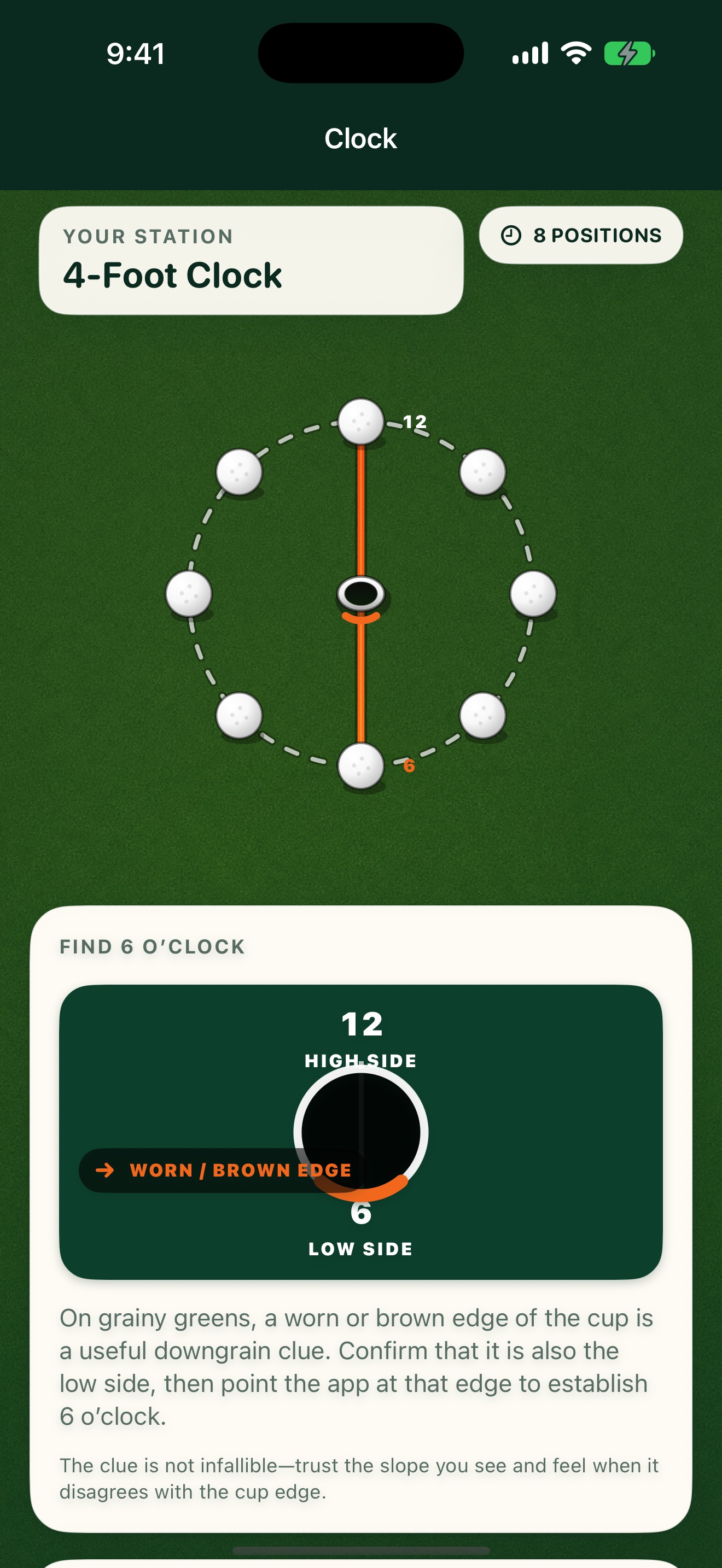
Mark the center of the cup, then identify its low side yourself. PuttStation uses your chosen direction to establish 6 o’clock below the hole and 12 o’clock above it, then lays out eight evenly spaced four-foot putts around the cup.
GET A FEEL FOR THE SETUP
Make this
station yours.
Practice uphill, downhill, left-breaking, right-breaking, and blended reads from one organized station.
The interactive plan illustrates the layout. You’ll use your iPhone camera to place the real station.
You identify the low side. The app uses it as 6 o’clock.
ON THE GREEN
Build it.
Then work through it.
Set up your station
- 01
Set the center of the target or cup.
- 02
Aim the second point toward the low side of the cup.
- 03
Fine-tune the rotation, then place all eight ball markers.
A SIMPLE SESSION TO TRY
1. Start at 6 o’clock and work around the cup.
2. Read the putt and call the break before every stroke.
3. Compare how much pace you need from the low side versus the high side.
Keep your own score. PuttStation builds the layout; it doesn’t track putts.BRING A PLAN TO THE PRACTICE GREEN.
Make your next
practice count.
Your iPhone. A few tees and markers.
A better way to set up the work.